
Cost of goods per product
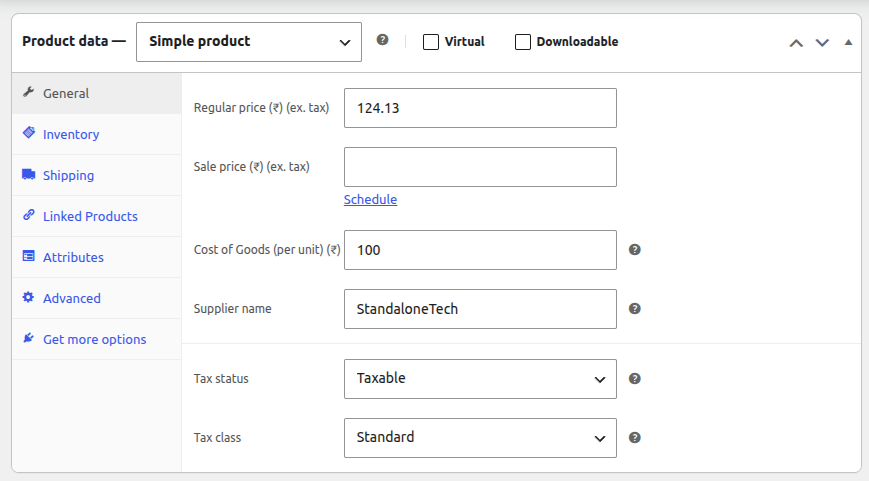
Add your real unit cost to every product and every variation, plus an optional supplier name. Variations without a cost use the parent product's cost.
Profitly adds your cost of goods, payment gateway fees and shipping costs to every order, so you see what you actually earn per order and per product. Right inside WordPress. No spreadsheets, no monthly fee.
Free forever · No account, no card · Set up in 5 minutes
Your WooCommerce reports tell you how much money came in. They don't tell you how much you kept after paying for the product, the payment gateway and the courier. So most store owners guess their margins — and some find out too late that a best-selling product barely breaks even.
| Order total | $100.00 |
|---|---|
| Cost of goods | − $52.00 |
| Gateway fee (2.9% + $0.30) | − $3.20 |
| Your shipping cost | − $9.00 |
| Net profit | $35.80 (35.8% margin) |
WooCommerce reports this order as $100. Profitly reports it as $35.80 — the number that actually reaches your bank.
Free forever · No account, no card · Set up in 5 minutes
Set your costs once. Profitly calculates profit on every new order automatically.
Add your real unit cost to every product and every variation, plus an optional supplier name. Variations without a cost use the parent product's cost.
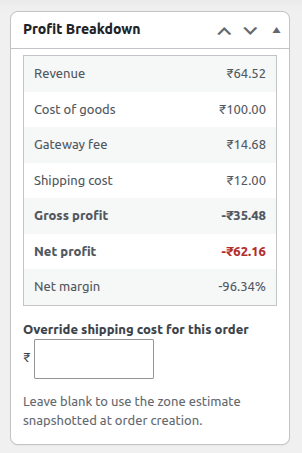
Each order shows revenue, cost of goods, gateway fee, shipping cost and net profit in a clear breakdown box on the order screen.
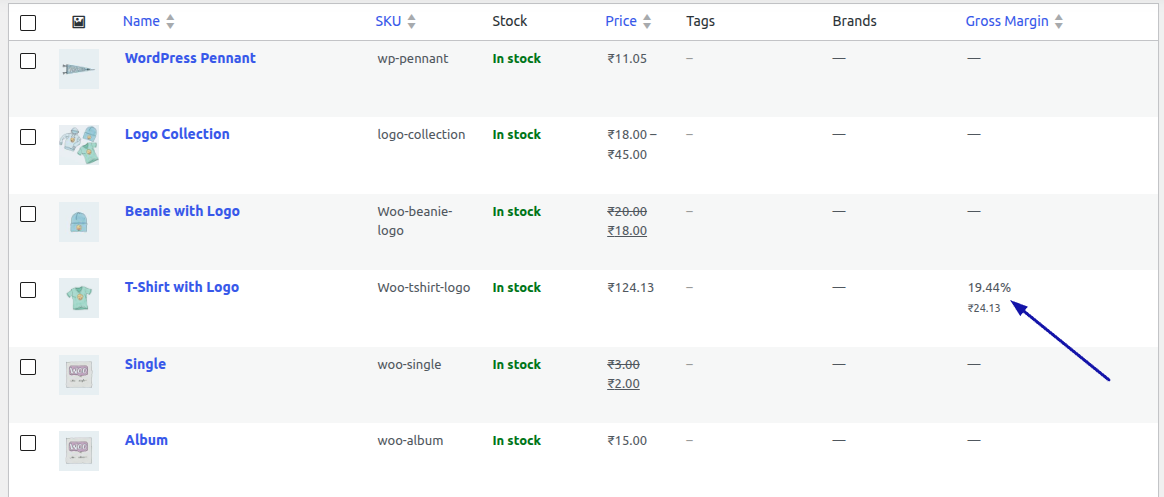
A new Gross Margin column in Products lets you spot low-margin items without opening each one.
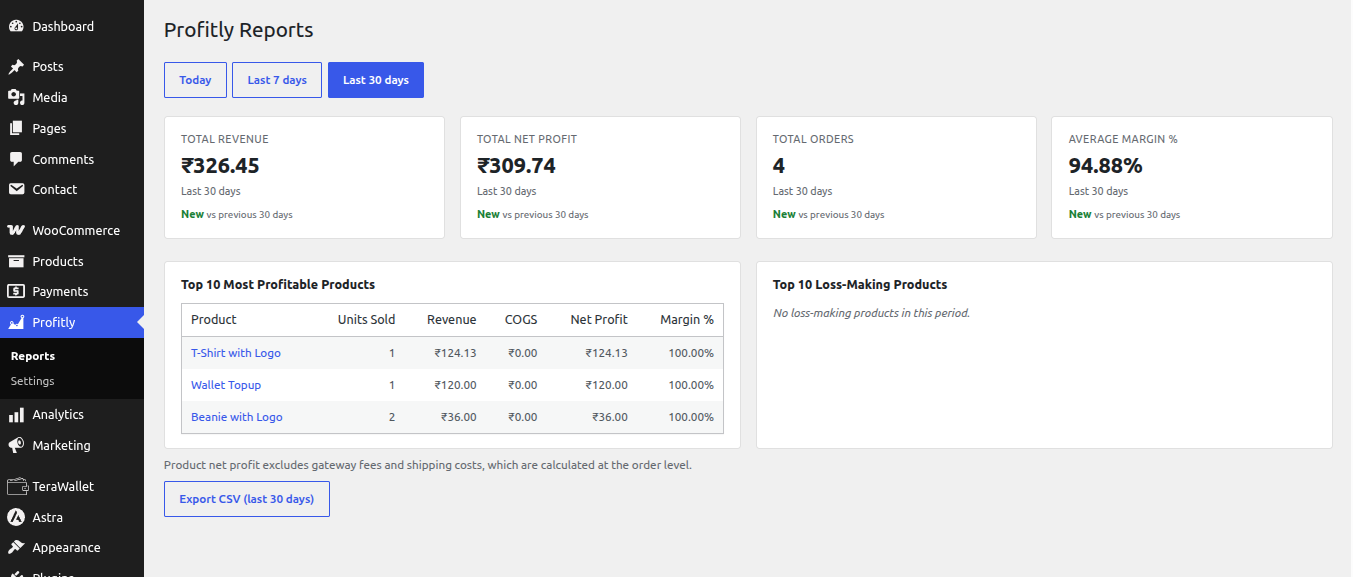
Revenue, net profit, orders and average margin for today, the last 7 days or the last 30 days — each compared with the period before.
See your 10 most profitable products and the 10 products that are losing you money, side by side.
Enter the profit you want. Profitly tells you the revenue, orders and daily pace you need, based on your own margin.
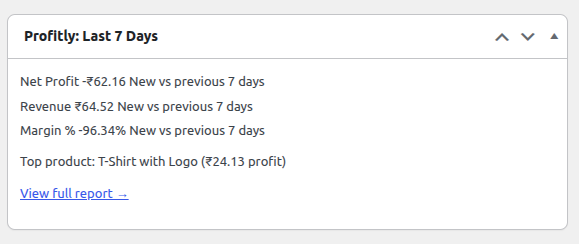
A last-7-days profit snapshot on your WordPress dashboard, the moment you log in.
Export order-level profit for the last 30 days. Opens cleanly in Excel and Google Sheets for your accountant.
Free forever · No account, no card · Set up in 5 minutes
This is the detail most profit plugins get wrong. When an order is placed, Profitly saves ("snapshots") the cost of goods, the gateway fee settings and the shipping cost onto that order. If your supplier raises prices next month and you update your product cost, only future orders use the new cost. Your history stays exactly as it happened.
January — product cost is $40. 120 orders are placed. Each order stores $40.
March — your supplier raises the price. You change the cost to $48.
Result — January's report still shows cost $40 and the same profit. March orders use $48.
A profit report you can't trust is worse than no report. Snapshotting is why Profitly's history stays accurate for bookkeeping.
Snapshots are saved for orders from classic checkout, block checkout, the admin screen and the REST API.
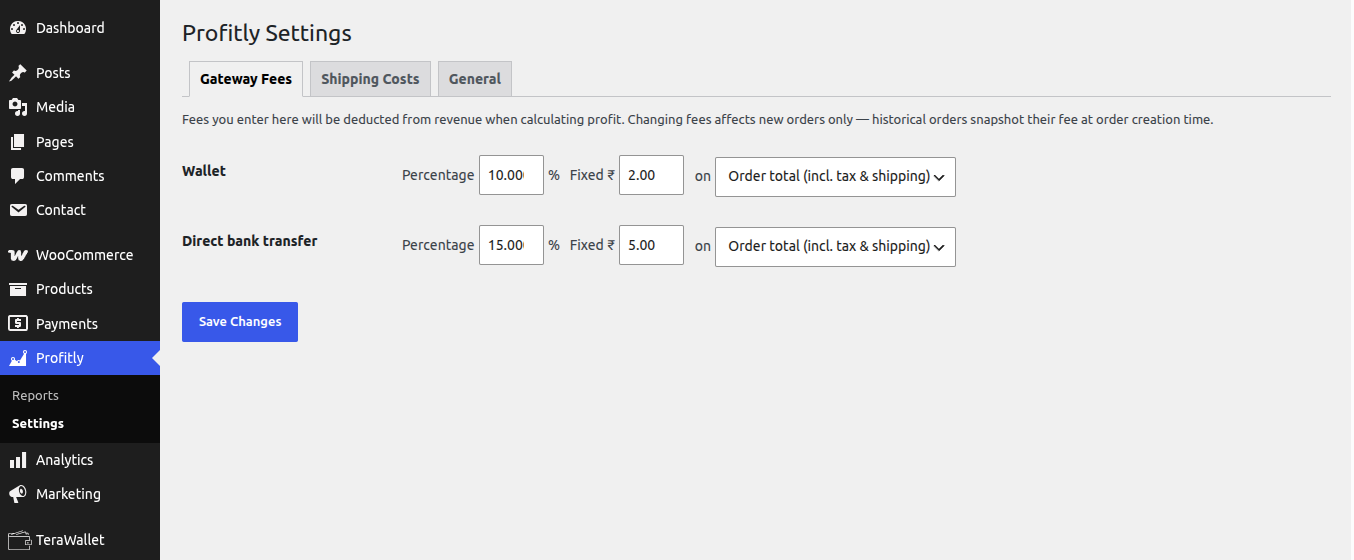
Set a percentage, a fixed fee per order, or both, for each payment gateway. Choose what the percentage applies to: order total, subtotal plus shipping, or product subtotal only.
What the customer pays for shipping is revenue, not cost. Pick the model that fits your store:
A refund reduces revenue and cost of goods, but the gateway fee stays as a loss — because most gateways keep their fee. Your profit shows what really happened.
All money math uses exact decimal arithmetic, so no small rounding errors build up across thousands of orders.
Open Profitly → Profit Target, type the profit you want to make, and Profitly works out what it takes — using your own store's margin and average order value, not industry averages.
Target profit $5,000 · Your net margin 25% · Average order $80
Revenue needed $20,000 · Orders needed 250 · About 8.3 orders per day over 30 days.
A margin table also shows how much less revenue you'd need at a better margin — for example, $16,667 at 30% instead of $20,000 at 25%.
The planner is a projection from your Profitly data, not a full business forecast. It doesn't include salaries, rent, software, taxes or loan costs — and it says so on the screen. If you have fewer than 25 orders in the baseline, it warns you the sample is small.
Free forever · No account, no card · Set up in 5 minutes
Find out if shipping is quietly eating your margin.
See the real profit impact of every discount campaign.
Track supplier cost against selling price, product by product.
You're making sales, but the bank balance doesn't match. Profitly shows why.
Add your product costs before you start selling. Profit is calculated from the cost saved at the time each order is placed, so orders placed before you add a cost won't have one.
Free forever · No account, no card · Set up in 5 minutes
| Current version | 1.0.3 |
|---|---|
| WordPress | 6.4 or higher (tested up to 7.1) |
| WooCommerce | 8.2 or higher (tested up to 11.0) |
| PHP | 7.4 or higher |
| HPOS (High-Performance Order Storage) | Fully compatible |
| Checkout | Classic and block checkout |
| Currency | Reports each order in its own currency; no conversion. Built for single-currency stores. |
| Performance | Calculations run in the admin area only, never on your storefront. Reports are cached. |
| License | GPLv2 or later |
Profitly does all its calculations on your site and stores everything in your own WordPress database. It never sends your orders, customers, products, costs or profit figures anywhere.
Optional, anonymous usage data (plugin, WordPress and PHP versions) is off by default and only sent if you turn it on. You can turn it off and delete it at any time. See our privacy policy.
Yes. Profitly is free and GPL-licensed on WordPress.org. There is no trial, no account and no monthly fee.
For each order: revenue minus cost of goods, payment gateway fee and your shipping cost. Refunds reduce revenue and cost of goods, and the gateway fee is kept as a loss.
No. Profitly saves the cost onto each order when it is placed. A new cost only affects future orders, so your history stays accurate.
Yes. Set a cost for each variation. If a variation has no cost, Profitly uses the parent product's cost.
In Profitly → Settings, enter a percentage, a fixed amount, or both for each gateway, and choose whether the percentage applies to the order total, subtotal plus shipping, or product subtotal.
What the customer pays is revenue. Your shipping cost is what you pay the courier. Profitly lets you record your real cost, so shipping losses don't hide.
Yes. Profitly supports WooCommerce High-Performance Order Storage and both the classic and block checkout.
Yes. Export order-level profit for the last 30 days as a CSV file that opens in Excel or Google Sheets.
No. All data stays in your WordPress database. The only exception is optional anonymous usage data, which is off unless you turn it on.
No. Profit calculations run in the WordPress admin, not on the storefront, and report results are cached.
Install Profitly free from WordPress.org. Add your costs once, and your next order shows its real profit.
Free forever · No account, no card · Set up in 5 minutes
Free forever GPLv2 licensed No external service